Play Hex Arrow Game Online for Free
Hex Arrow Game is a puzzle game built around hexagonal tiles, each marked with an arrow. It has over 1,000 hex arrow puzzles to solve.
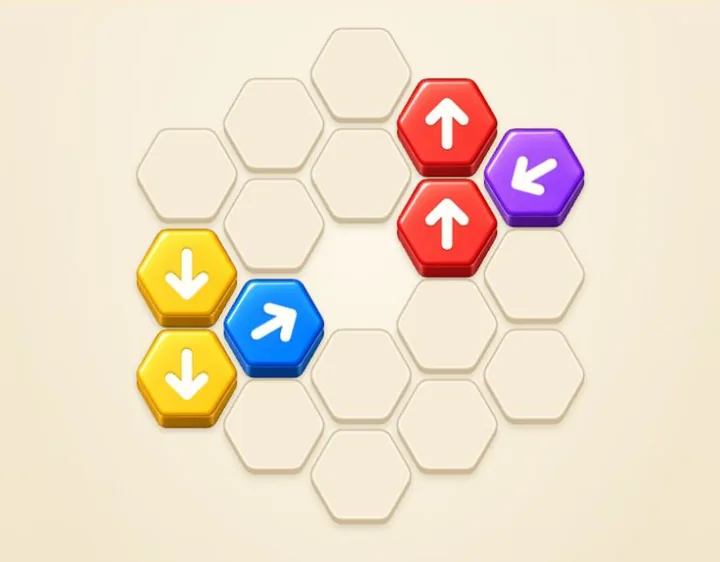
In this arrow button game, tapping a tile sends it in the direction its arrow points. If another tile blocks its path, the move fails but still uses one of your limited moves. Plan the order of your taps to clear the board before you run out of moves.

How to Play Hex Arrow Game
- Follow an arrow’s direction and check the whole path in front of it.
- Tap or click the tile when that path is clear. Removing it can open a route for another tile.
- Keep clearing arrows until the board is empty. Watch the moves counter: a blocked tap still uses one move.

Plan Around Blocked Arrows and Gaps
On Level 1, the blue tile can leave first. Removing it opens the red tile’s path; removing red then frees green. The yellow tile has its own clear exit.
Some layouts have holes inside the board. Check whether an arrow points toward one of these gaps, as it may have a shorter way out. Look closely: an empty platform still carries a tile’s path, while a missing platform is an exit.
Hammer, Bomb and Rotate Power-Ups
| Power-up | Unlocks | What it does |
|---|---|---|
 Bomb Bomb | Level 6 | Removes the selected arrow and arrows on its six neighboring cells. |
 Hammer Hammer | Level 9 | Removes one selected arrow. |
 Rotate Rotate | Level 12 | Turns one arrow clockwise by 60°. |
Choose a power-up, then tap an arrow to use it. Power-ups do not spend a normal move. Uses are limited in each level and reset when you restart that level.
Tips for Solving Hex Arrow Puzzles
- Look for exits at the edge. Start with arrows pointing off the board, then check their paths for blockers. Clear the ones that already have room to leave.
- Look again after each clear. Removing one tile can open a route for several others. Follow those new openings instead of spending moves on blocked taps.
- Use Bomb on crowded groups. When several arrows are packed together, target a tile with arrows on its neighboring cells. Bomb removes the target and its immediate neighbors, which can open several paths with one use.
- Use Hammer on a key blocker. A single tile holding up several arrows can be a useful Hammer target. Remove it, then check which of the arrows behind it can now leave.
- Rotate toward a clear route. Rotate turns an arrow one step clockwise by 60°. Check that next direction before using it, and choose a tile that will then point toward a clear exit.
1,000+ Levels and Saved Progress
Early levels introduce the directions and power-ups before the boards become more crowded. Later puzzles mix longer blocking chains with easier recovery levels.
Use the level-list button at the top left to revisit an unlocked level. Your current level is saved automatically in this browser, so you can return to it later.
For a four-direction puzzle, try the original Arrow Game.
Hex Arrow Game FAQ
Is Hex Arrow Game free to play?
Yes. All 1,000+ levels are free to play in your browser, with no download or account required.
Why does an arrow bounce back?
Another tile is blocking its arrow’s path. Clear the tile in front first, or use an available power-up. A blocked tap costs one move.
Can a tile leave through a hole in the board?
Yes. A hole is a missing platform cell. If a tile’s path reaches one, the tile leaves the board there. An empty hexagonal platform is still part of the path, so it does not act as a hole.
What happens when I run out of moves?
Tap Try again to restart the current level with a fresh move count and that level’s power-ups restored.
Will my progress be saved?
Yes. Your current level and unlocked levels are saved in this browser. When you return, the current level starts from the beginning. Progress does not sync between devices, and clearing site data removes the save.
Can I play Hex Arrow Game on mobile or PC?
Yes. Play in a modern browser on Windows or Mac, or on an Android phone, iPhone or tablet. Tap tiles on a touchscreen or click them with a mouse. No download is needed.